Your content already contains signals about what is working, what is losing momentum, and where your next opportunity might be.
Clariti brings those signals together. It connects your WordPress content with its Google Analytics performance, Google Search Console queries, technical details, and the organizational context you add inside Clariti.
Now, the Clariti MCP gives you a new way to work with all of it.
Instead of starting with a dashboard, filter, or report, you can start with a question:
“What are my top five posts from the last 30 days?”
“Which posts are losing traffic and haven’t been updated recently?”
“Which topics are growing compared to last year?”
Ask in Claude, ChatGPT, or another compatible AI tool, and it can use the Clariti MCP to retrieve the relevant information from your site’s Clariti account.
The result is not generic AI advice. It is a conversation grounded in your content and its actual performance.
Clariti already does the hard part
Google Analytics can tell you how much traffic a URL received. Google Search Console can tell you which queries led people there. WordPress holds the content itself, along with its publication history, categories, links, images, and other details.
Clariti connects those pieces at the content level.
That means a post is not simply a URL with a pageview count. Inside Clariti, it can also have a title, publication and modified date, category, traffic history, search queries, technical issues, Labels, Notes, and Projects.
That connected foundation is what makes the Clariti MCP useful.
When you ask which posts are losing traffic and have not been updated in six months, the AI does not have to rely on a screenshot or a spreadsheet you assembled. It can compare performance periods through Clariti, identify meaningful declines, and check the update history for the affected content.
Clariti has already organized the context. The MCP makes that context available inside the AI tools you use.
What is an MCP?
MCP stands for Model Context Protocol. It is a standard way for AI tools to connect with other products and data sources.
In this case, the Clariti MCP connects your Clariti account with a compatible AI tool. When you ask a question, the AI can use Clariti’s MCP tools to find the content and information needed to answer it.
You do not need to write code or know where every metric lives. You can ask a question in everyday language, review the answer, and keep exploring from there.
Start with a straightforward question
One of the easiest ways to begin is with a question you already ask about your content:
“What are my top five posts from the last 30 days?”
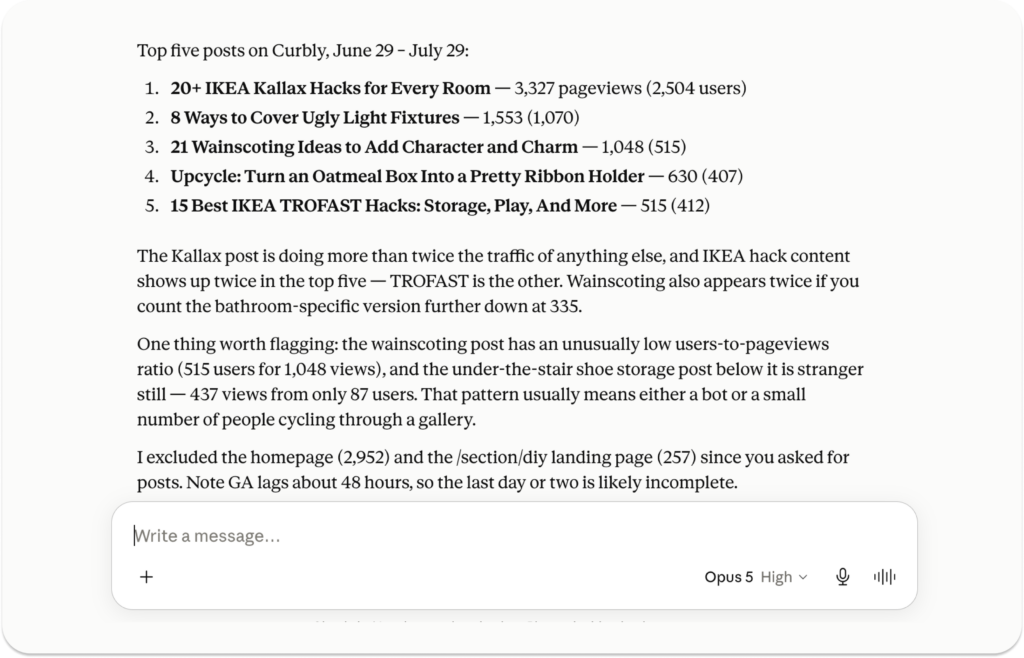
That gives you a useful performance snapshot, but the real advantage is what you can ask next:
- What do these posts have in common?
- Which one grew the most compared to the previous period?
- What traffic sources are contributing to their performance?
- Are these long-running performers or recent gains?
- Which categories are represented most often?
- Do I have related posts that are not performing as well?
You are no longer limited to the first report you thought to run. You can follow the answer wherever it leads.
Find content that deserves your attention
A large content library can contain hundreds or thousands of possible updates. The harder question is not whether something could be improved. It is where your time is most likely to matter.
You might ask:
“Find 10 pieces of content that used to perform well but have been declining, and that I haven’t updated in at least six months.”
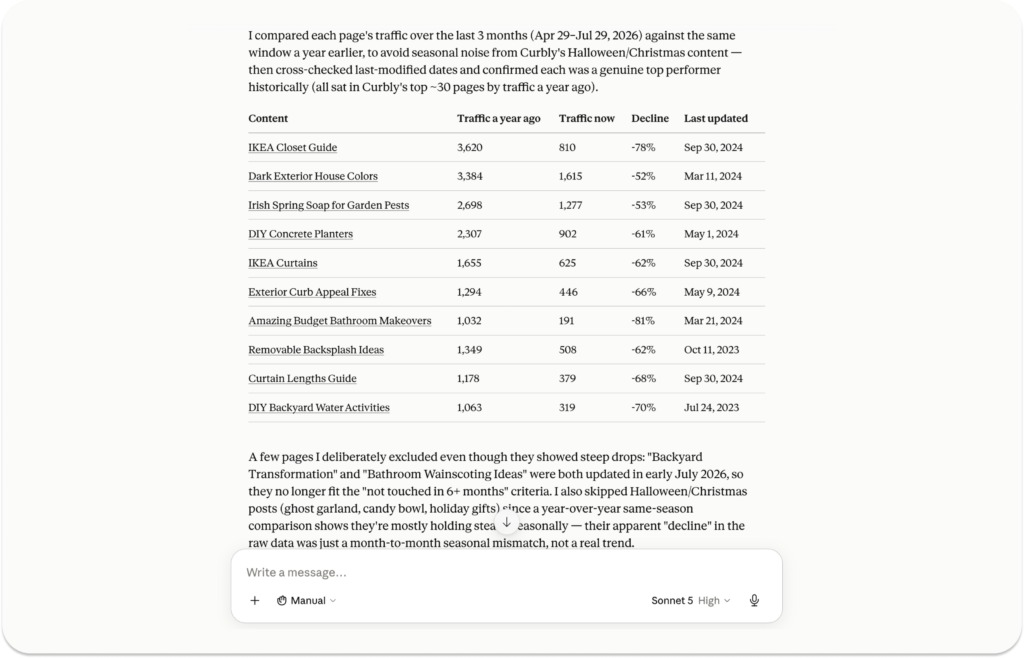
To answer that well, the MCP can bring together two different parts of Clariti:
- Performance data showing which posts have experienced a meaningful loss.
- WordPress data showing when each post was last modified.
That produces a more useful starting point than a list ranked only by percentage decline. A post that lost 50% of 10 monthly pageviews probably does not deserve the same attention as a post that lost thousands.
The MCP can help narrow the library. You can then apply what only you know about your business, including seasonality, revenue potential, strategic importance, and the amount of work an update would require.
Look for patterns across your content
Sometimes the most useful answer is not a single post. It is a pattern across many posts.
During early testing, one creator compared their strongest and weakest content over an 18-month period. The analysis helped identify subjects shared by the stronger posts and topics that were not performing as well.
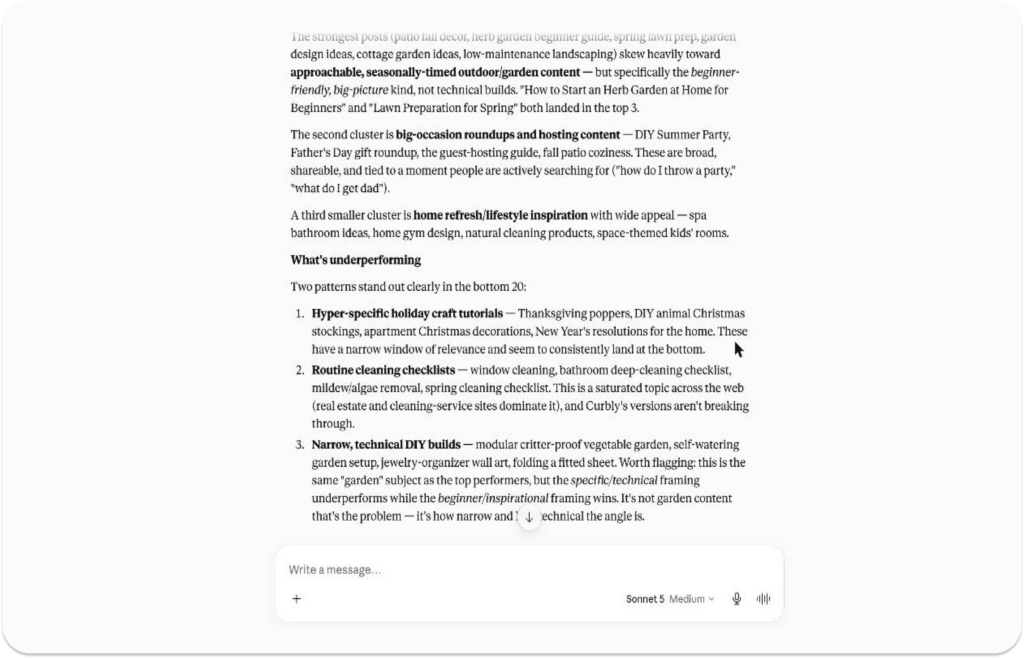
You can also ask Clariti to compare performance by category:
“Which content categories are growing compared to the same period last year?”
That can help you see where audience interest is gaining momentum, where it is cooling off, and where you may want to investigate further.
The goal is not to let AI decide your content strategy. It is to give you a faster way to find the evidence that can inform it.
Plan around seasonal performance
If your business depends on seasonal content, one year of data does not always tell the whole story. A post may have performed well because of a temporary spike, while another may have delivered consistently every holiday season for five years.
The Clariti MCP can look across multiple complete years to help answer questions such as:
“Which posts perform best during Q4?”
“What should I consider re-promoting this summer?”
“Which holiday posts have performed consistently across several years?”
The results can include how many years contributed to each post’s performance, helping you distinguish a dependable seasonal winner from a one-year outlier.
From there, you can ask for the publication date, last modified date, category, or recent performance of the posts you are considering.
Prioritize technical issues by their potential impact
Not every broken link or missing meta description carries the same weight.
With the Clariti MCP, you can ask:
“Which of my highest-traffic posts have broken links?”
“Find posts with missing meta descriptions and rank them by recent traffic.”
“Which posts have images with missing alt text?”
Clariti already detects and organizes these content details. The MCP lets you combine them with performance data, making it easier to focus on issues affecting content people are actually visiting.
You can also explore details such as structured data, heading counts, internal and external links, reviews and star ratings, categories, tags, word count, and other information synced from WordPress.
Explore traffic sources and search performance
Because Clariti connects GA4 and Google Search Console data with individual pieces of content, you can move between traffic performance and search behavior without losing the content context.
For example:
- “What are my top traffic sources this month?”
- “Which posts receive the most traffic from Pinterest?”
- “Which posts have lost the most pageviews between these two periods?”
- “What Google Search queries are driving clicks to this post?”
- “How has this post’s position for this query changed over time?”
- “Which posts are gaining traffic even as the rest of the site is declining?”
You can adjust the date range, choose between pageviews, users, and sessions, or narrow the analysis using the Labels and Projects you already use in Clariti.
Why this is different from uploading a screenshot
Uploading an analytics screenshot to an AI tool can be helpful for a quick interpretation. But the AI can only see the date range, metrics, and rows included in that image.
If the answer raises another question, you may need to return to Clariti, change the report, and upload another screenshot.
The Clariti MCP allows the conversation to continue. The AI can request the additional Clariti information needed for the next question, whether that is another performance period, a post’s modified date, its category, its traffic sources, or its Google Search queries.
That is the larger opportunity. You are not simply asking AI to explain a chart. You are giving it access to the connected content context Clariti has already built.
A new way to work with Clariti
The Clariti dashboard is still your home base for understanding and organizing your content business. The MCP extends that foundation into the AI tools where you may already be researching, planning, and working through decisions.
Clariti connects the information. The MCP lets you ask more of it.
We are rolling out the Clariti MCP gradually and working closely with an initial group of creators as we continue expanding what it can do.
If you would like to explore your content, performance, and search data through Claude, ChatGPT, or another compatible AI tool, join the beta waitlist.

Your content already has a history. Now you can ask what that history can teach you.

About the Author
Jen is the Associate General Manager at Clariti with a soft spot for great tech and good snacks. She has a Master’s degree in Human-Computer Interaction (which is a fancy way of saying she’s really into how people and tech get along). When she’s not working, you can usually find her hanging out with her family or baking something she’ll insist is “just a little treat.”