





















Analyze your WordPress content using Google integrations
Clariti helps you uncover SEO insights and monitor performance improvements by analyzing your WordPress and Google data in real-time.


Trusted by top Bloggers

Unlock Your Free Content Audit Checklist!
New!
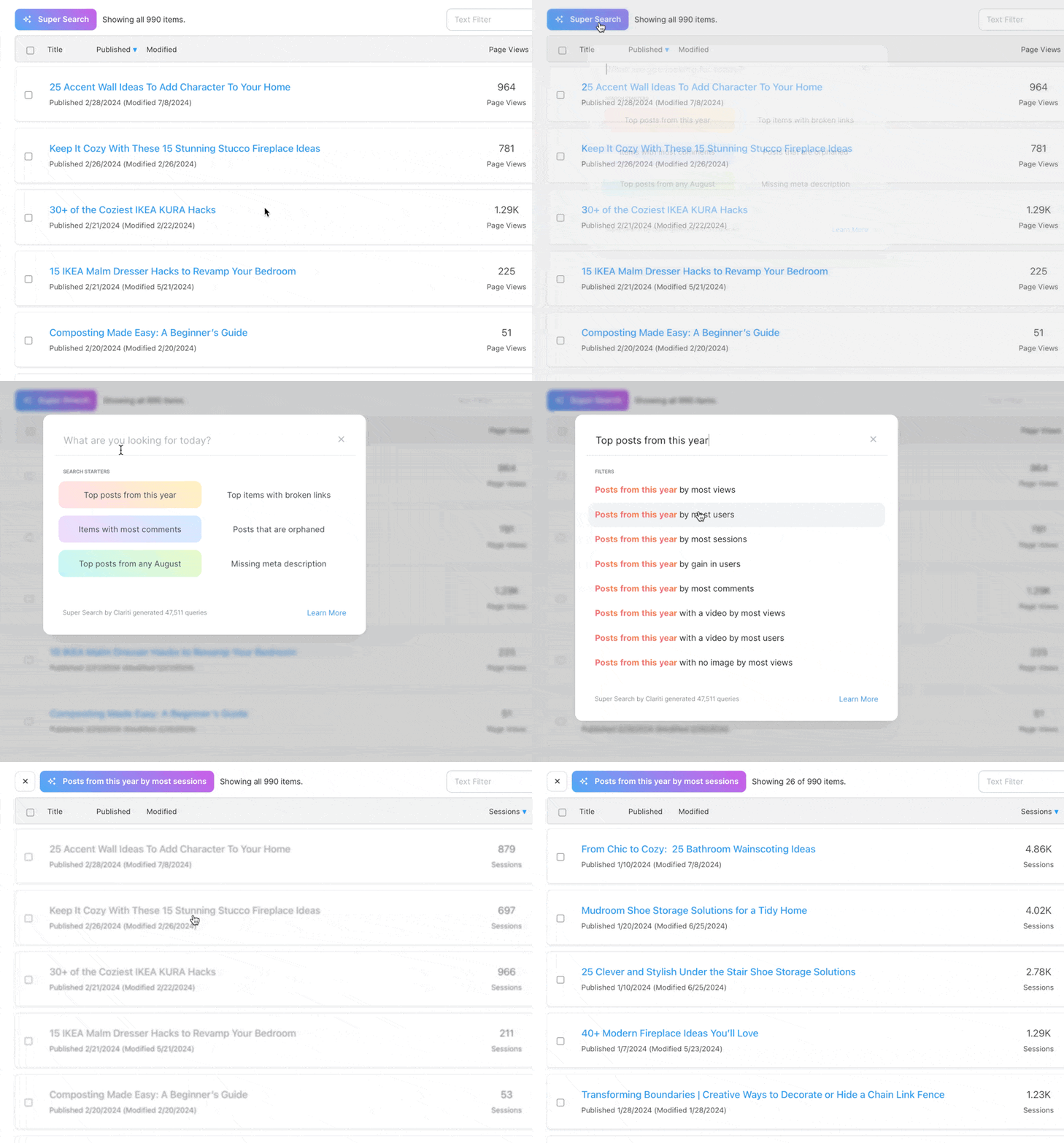
Find insights faster with Super Search ✨
Locate specific content in a pinch with an intuitive search experience. Your content is instantly filtered exactly the way you want it with just a few keystrokes, so you can complete important tasks faster than ever.
Try Super Search in the DemoThe easiest content auditing tool you’ll ever use
Gain insights in a few clicks. Prioritize what matters most. Optimize better.
Simplify your workflow
Combine WordPress & Google data into manageable projects so you can proactively find optimization issues & track content updates and keyword performance – all in one platform.
Start Simplifying
Boost your content’s impact in less time
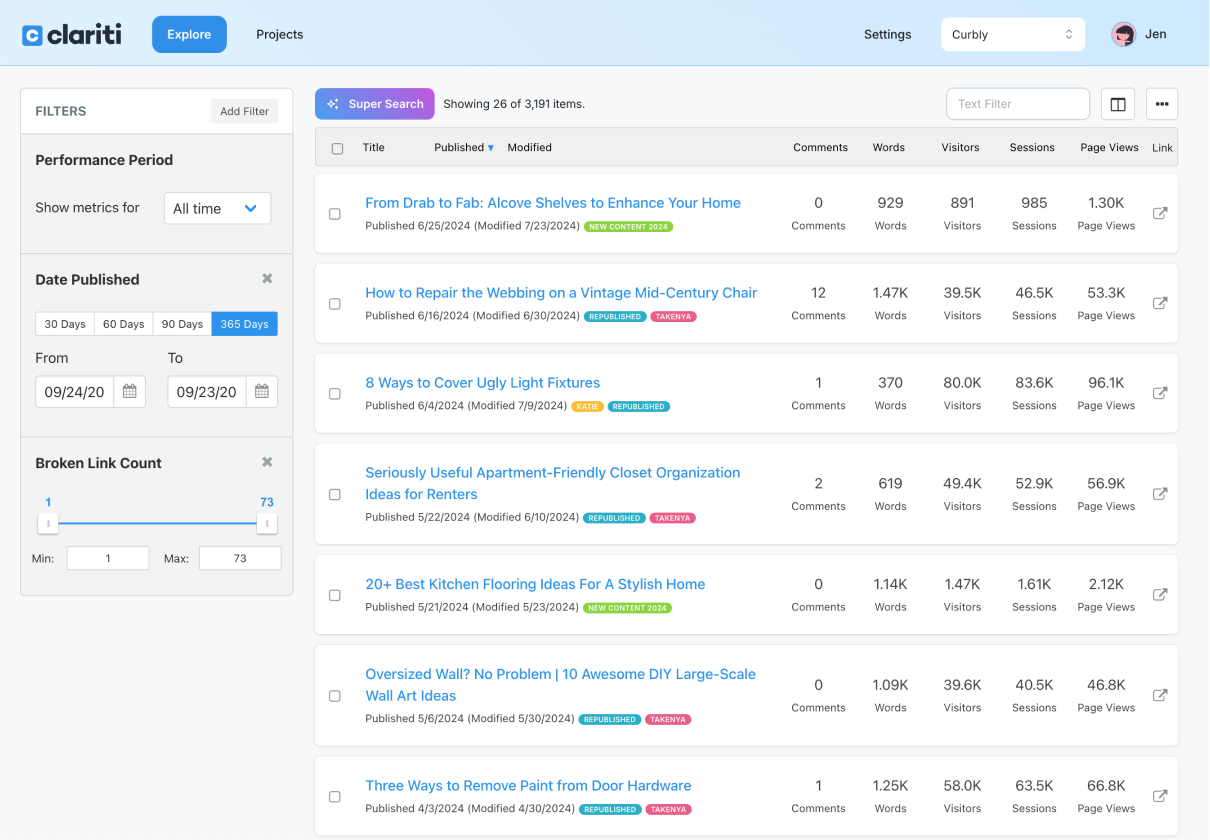
Real-time data, smart filters: No more spreadsheets
Real-time data syncing keeps everything up-to-date, while our powerful filtering system helps you declutter and zoom in on key areas of your blog so you can make smarter decisions faster.
Blog performance analysis, simplified
From WordPress to Google, Clariti seamlessly integrates all your blog’s data into a single platform to help you quickly analyze performance, identify issues, and discover growth opportunities for your content.
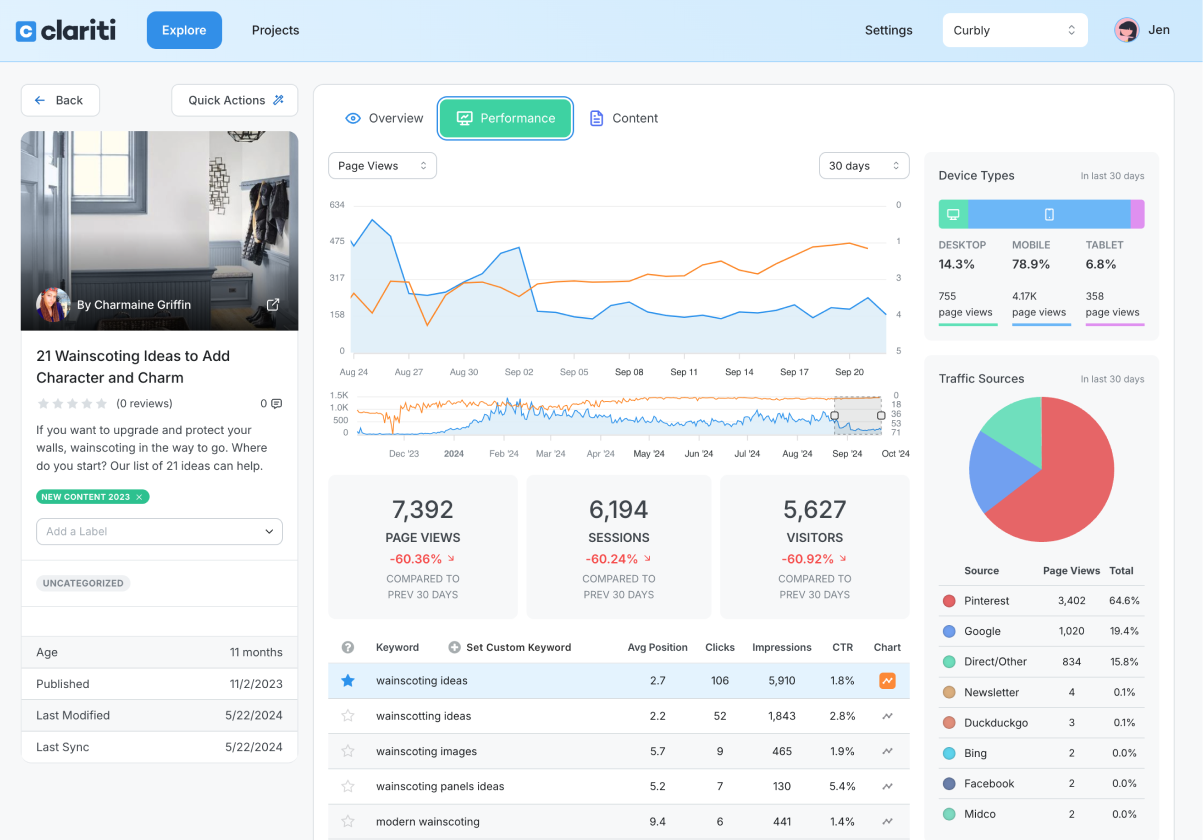
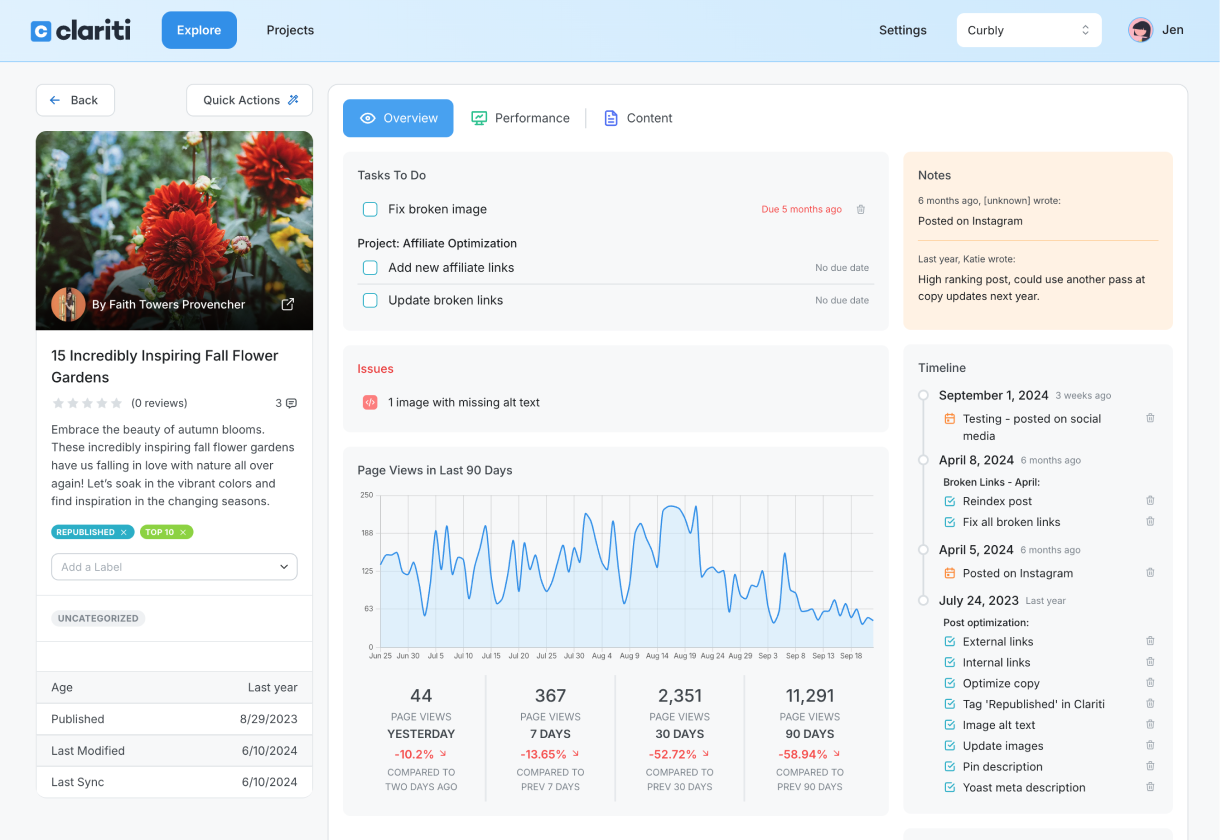
Track everything easily and never miss a beat.
Effortless project and update tracking keeps you informed. With features like notes, events, and timelines you can see all updates in one place and stay ahead of the game.
For me, it’s all about the data. If you can’t measure it, you can’t manage it. Clariti allows me to track the data I need to manage my business, and it shows me everything all at once, so I can make quick decisions about what needs attention next. In fact, we use it so often that it’s tabbed on my computer!”
--- Jenn Fishkind / Princess Pinky Girl
Clariti has helped me create a concrete plan of attack for working on content: updating, optimizing, and coming up with a schedule for promoting posts on my website.”
--- Ashley Covelli / Big Flavors From A Tiny Kitchen
I used to track all my websites’ blog posts in an Excel spreadsheet or via Google Search Console. But with Clariti, I can see what is getting the traffic and how long it’s been since I updated something much more quickly. I can also see how long people spend on the site and any dead links, all on one dashboard. Clariti makes it easy for me to know what’s tracking well and what needs attention.”
--- Paula Morgan / Sydney Expert
Powerful features for customizable audits and optimization
-

Create organized projects
-
Analyze performance
-
Discover traffic sources
-
Track keywords
-
Post notes and annotations
-
Find broken links & images
-
Track down orphaned content
-
Review page metadata
-
Locate missing alt text
-
Invite teammates
Here's what our customers are saying:
I use Clariti throughout my workday to help me organize and optimize my posts in a streamlined way that beats every system I’ve ever had through the 16 years of my website.
Clariti helps me strategically figure out what posts need to be optimized via their varied presentation of traffic data. I use their labels to flag posts that need to be optimized and deleted. I also use labels to identify posts by category and event, so that I can quickly pivot from season to season and see where I can get the most impact.
Clariti has been a LIFESAVER ever since Google Analytics was retired…it takes my Google data and serves it up in so many useful ways. And to top it all off, their customer service is top-notch – I hear from them immediately if I need help with anything. HIGHLY RECOMMEND!
Clariti is my favorite tool, and the only one I use every single day. It keeps me organized with projects that help update content, which is totally worth its monthly fee.
My favorite feature is the Overview Tab that shows every keyword a post ranks for, and how high it’s ranking. I also love the Performance Tab because it indicates where my traffic is coming from with a visual chart that’s easy to follow. If a post isn’t doing well in Google search, I can check Clariti to find out if it’s performing on Pinterest or other sources with a click of a button. The Content Tab is also helpful because it lists internal, inbound and external links, as well as any missing alt text. This feature alone has saved me tons of time and energy!
I’ve been using Clariti since it was first introduced and can’t say enough great things about how it’s helped me manage my business!
I use Clariti every day! It’s such a great resource for staying on top of tasks, as well as broken links & images. It’s also easy to see at a glance which posts are driving traffic, and which have slowed.
Whenever I think of a new project, I just add it to the list. With hundreds of blog posts, Clariti makes it easier to keep track of which recipes have been shared with my email readers, and which recipes still need ingredient & process shots or videos.
I have been using Clariti for 3.5 years. It is a comprehensive tool that houses analytics, post-related metadata, internal/external link inventories, and more, all in one place.
The project feature makes it easy to stay organized and track projects, such as post updates or routine checks for missing ALT TEXT or broken links. The ability to filter posts by a wide range of criteria is game-changing.
My favorite feature is the labels, which provide another way to categorize content (at a more granular level than blog categories). One way I use labels is to track various changes I’ve made to posts, so I can easily filter those posts and monitor how those changes have impacted my traffic. I log into Clariti every single day, and could not function without it! Thank you for developing such a great tool!
Clariti changed the game for me when it comes to analyzing my site. GA4 and console are confusing and not user friendly – plus they don’t have actionable things you can do on Day 1. Clariti is the best tool! Day 1 you can see what needs cleaned up, what to focus on and where your money is coming from. I love it!!!! Customer for Life!
After 10 years of blogging, I had over 1200 recipes and no real way to organize them. Clariti has changed everything! I love how many different ways there are to sort the data. Seeing keyword ranks and traffic in a graph form over time is really eye opening as well. I get so much satisfaction out of creating a new project and checking all of the boxes as I work through it. I recommend Clariti to all of my blogging friends. I don’t know what I would do without it!
From Our Blog
How to use audit and optimization insights to improve content performance


Frequently asked questions
Who is Clariti the best fit for?
We welcome any and all users. For now, we’ve found that those who have quite a few posts (200+) are the ones that benefit from Clariti the most. Clariti is primarily focused on helping content creators organize and optimize their portfolio of content.
However, if you have a smaller blog and see yourself growing to that size soon, now is a great time to start organizing your blog content so you can better optimize your existing content in the future.
Does Clariti only work with WordPress websites?
Correct. We'd love to expand out to other content management systems at some point, but we'll be focusing on WordPress for the foreseeable future.
Does Clariti work with custom post types?
Yes! Clariti works with sites that have custom post types. Reach out to support if you do not see your custom post types after joining Clariti.
Does Clariti support sites with multiple languages?
For the most part, Clariti is able to handle multi-language sites just fine. If you have concerns about your site compatibility, please contact [email protected].
What is the current price of Clariti?
We offer flexible plans tailored to fit your content business. Visit our pricing page to find the plan that’s right for you.
Can I add multiple sites to Clariti?
Yes, we charge per site per month, and you can use the same account to access multiple sites.
Can I add multiple users to my site within Clariti?
Yes! You can add up to 10 team members for free within your account settings.
Can I cancel if Clariti isn’t for me?
Yes, of course! Simply end your subscription by emailing [email protected].